Overview
The main risks that may arise in work with DSE are musculoskeletal disorders such as back pain or upper limb disorders (sometimes known as repetitive strain injury or RSI), visual fatigue, and mental stress. While the risks to individual users are often low, they can still be significant if good practice is not followed.
The use of display screens at work is now so common that the amount of ill health cases associated with such work is significant and controlling the risk is important. Legislation places a duty on employers to assess and control the risks to those who regularly use display screen equipment like computers and laptops as a significant part of their normal work (daily for continuous periods of an hour or more).
Some users of DSE experience aches and pains in their hands, wrists, arms, neck and shoulders following long periods of DSE work. You can usually avoid these problems by ensuring you have a good workplace design, and you use the workstation correctly. You should also ensure good working practices are followed and regular short breaks from the DSE are taken. In addition, unsuitable use of DSE can lead to headaches or stress.
The main reasons for this are:
- Poor posture.
- Insufficient or no breaks from screen work.
- Insufficient training on new technology.
- Stress due to the pace of work.
- Glare and reflections on the screen.
- Use of incorrect spectacles (or lack of use).
What can you do to help yourself?
Watch the DSE video guide here

Arrange a DSE Assessment scan the QR Code below of click the Link Here
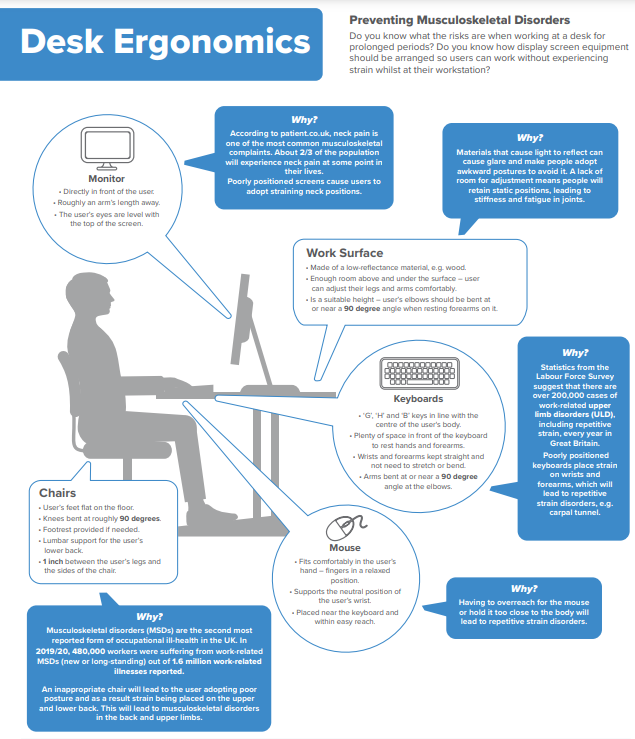
Desk Ergonomics Download a copy of the poster
DSE Trouble Shooting Guide – Getting comfortable
Take regular screen breaks by changing your work activities, i.e. to do filing or photocopying. Frequent short breaks are better than fewer long ones.

Workrave is a free program that assists in the recovery and prevention of Repetitive Strain Injury (RSI). It monitors your keyboard and mouse usage and using this information, it alerts you to take rest breaks and suggest guided exercises.
Eye Test and Spectacles Reimbursement (DSE Users)
The University will reimburse eligible employees for the cost of eye tests and, where required, spectacles that are necessary for work with display screen equipment (DSE), in accordance with this policy.
Eligibility and Claim Process
Employees who are identified as DSE users may claim reimbursement for an eye test and any required corrective spectacles. Claims must be submitted as a single claim through the Expenses system, up to the maximum reimbursement limit specified below.
Where an eye test confirms that spectacles are not required, the University will reimburse the cost of the eye test alone, subject to the same maximum limit.
Reimbursement Limits
The University will reimburse the reasonable cost of:
- an eye test, and
- necessary spectacles prescribed for DSE use, including lenses, basic frames, and lens tints where clinically required,
- up to the current reimbursement limit in operation (currently £60 in total, inclusive of the eye test).
Exclusions and Employee Contributions
Where an employee elects to purchase frames, lenses, or additional options beyond the basic specification, any additional cost incurred must be met by the employee.
Similarly, where lenses or frames are upgraded for reasons not related to DSE requirements, the employee remains responsible for the additional expense.
Payment Arrangements
Reimbursement will be processed via payroll and is exempt from Tax and National Insurance deductions, in line with HMRC requirements.
Display Screen Equipment (DSE) Eye Test Form
Frequency of Eye Tests
Eye tests will normally be funded once every two years.
However, employees may request an eye test at an earlier stage where they reasonably believe that their eyesight has deteriorated as a result of DSE work. In addition, where an optometrist advises more frequent eye testing (for example, annually) due to the nature of the employee’s role or their eyesight, reimbursement may be provided in accordance with that advice.
Useful Documents
Display Screen Equipment Policy
Display Screen Assessment Flow Chart
Display Screen Equipment (DSE) Workstation Assessment
Blended Working – Home working Self-Assessment Checklist
How to Claim for the eye test
1.Change Institute / Department to: Human Resources
Change Sub Department / Team to: HRS – Health & Safety
Date: Date of Receipt
Select Expense Type: DSE Eye Test
Description: Eye test (and glasses)
Gross: Amount claimed (maximum £60)
2. Select Cost Centre: A392 HRS(HS) Health and Safety
3. Attach Receipts: scanned copies of
· Form signed by Optician
· Receipt
4. Save
5. Submit